ZeroTrust seems to be one of those phrases that’s (a) crept up in the last few years, (b) got different meanings to different people.
In this post, I’ll put an opinionated collection of thoughts together setting out my views on ZeroTrust, some examples, some tools, and some general practices that are a level or two up from your basics.
ZT WFT?
ZeroTrust is, to me, as the name implies ‘trust nothing’. Instead of the idea that you log-in once, and bingo, you don’t need to do anything more for a year it’s all about more regular checks, but also modern systems will do a lot of this in the background, because they understand people hate doing this (and typing in your password 27 times in 8 hours helps no one apart from the people who set up keyloggers.)
In my view, zerotrust is about two types of personæ: humans, and machines. For both, the concepts are similar.
I’m also going to advocate here that zerotrust isn’t anything new per se, but just a rebrand of some tried-and-tested principles after marketing have come up with a new jazzy term as a way to generate noise (it’s winning), sales (it’s winning), and thought leadership (q.v. `noise` earlier).
ZeroTrust combines a few of those established disciplines:
- Principle of Least Privilege (`
PoLP`) - Segmented users
- Segmented networks
- Priviliged Access Management (`
PAM`) - Identity & Access Management (`
IAM`) - Authentication (`
Authn`) - Authorization (`
Authz`) - End User Behaviour Analytics (`
EUBA`) - Telemetry
- Mobile Device Management (`
MDM`) - Endpoint Protection (`
XDR`)
and can really help with ‘tidy-up’ associated with Joiners, Movers, Leavers processes
Defence in depth
I’m an advocate of ZT. I think when adopted it can really help as a defence in depth method. The reasons I say this are because:
- properly implemented, no one has standing/permanent access
- properly implemented, users aren’t inconvenienced and don’t look for workarounds that weaken security
- access is limited to a very tightly defined resource, so if an attacker gets in, their access is very limited.
- access is limited to a short-lived interval — if an attacker gets in, their access will expire automatically, limiting data exfiltration, discovery, data encryption etc.
- you ensure only the tightest permissions are granted, not `
god` mode or `grant all … to … %` - as part of the implementation you stock-check and work out what components **need** what access rights
Diagram
Lots of words; let’s have a picture that might help:
(if you click the image, you can explore it over on mermaid)
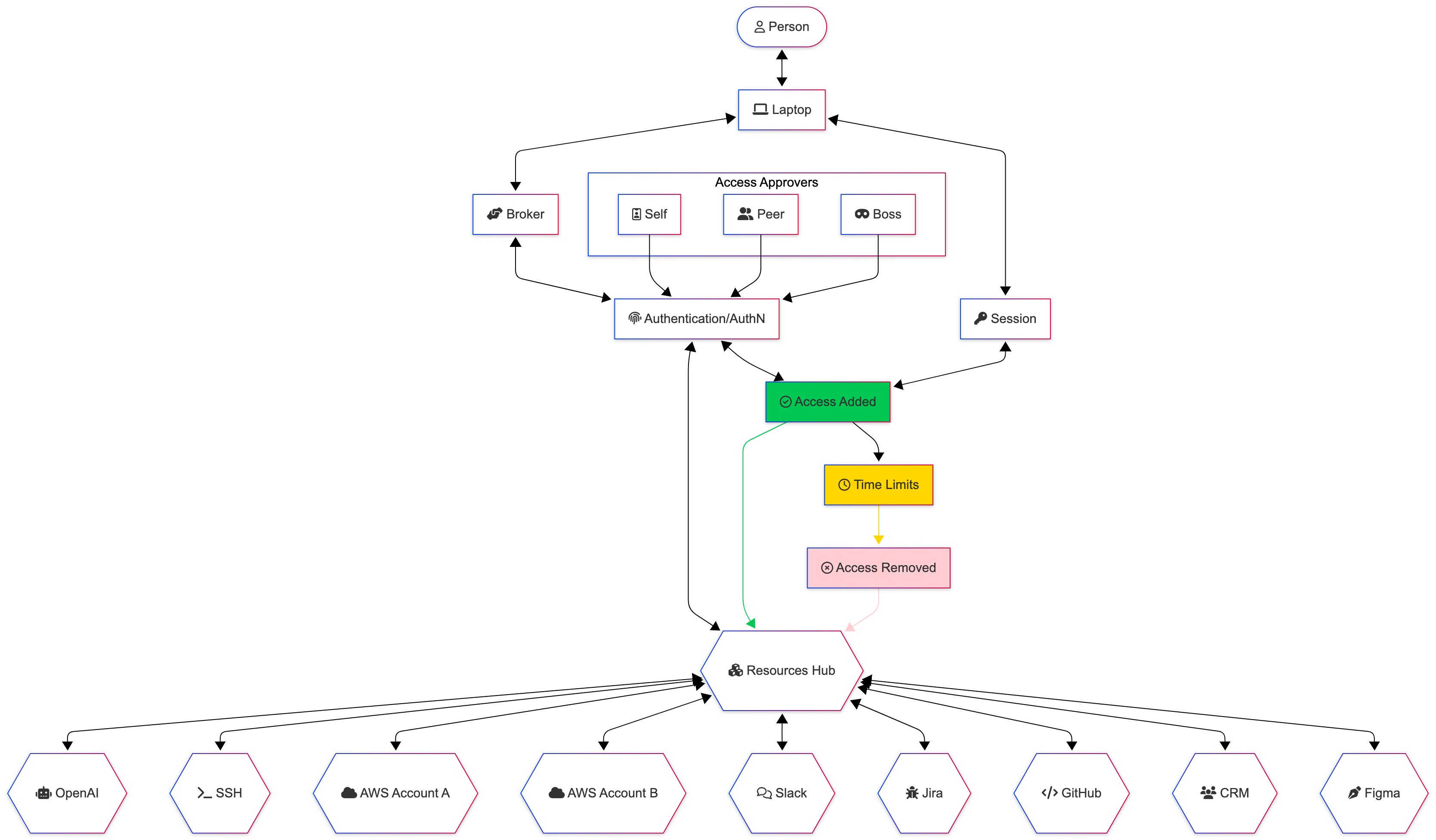
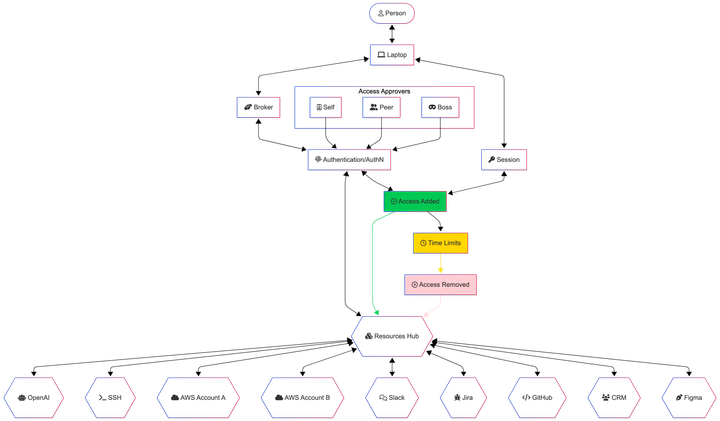
This is a human to *aaS (Infrastructure|Software|Platform|Services) diagram, showing a few of the players in a zerotrust (with a couple of liberties taken, because I don’t think we need to go into the nitty-gritty here).
The reason I’ve added laptop is to extend on another principle, that of
Mobile Device Managementand how this can build up a trust score. Let’s say your laptop is enrolled inInTuneorKandjiIru.Part of this enrolment process will associate the device into a more trusted network (let’s call it
managed-devices/staff-network).In addition to enrolment (being managed), we might also score along the lines of if it’s:
using a current/maintained operating system (and is updated enough)
anti-malware is up to date (and running)
not reported lost/stolen
Inverting this, we won’t trust, straight away, an unknown, unmanaged, personal device. We’ll require more hoops to jump through, because this other device is less trusted than something we have put controls on (disk encryption, screen locks, anti-ransomware, updates; the usuals).
The
brokeris a system used to manage the process; the current buzzword used by Gartner etc isCloud Access Security Broker(CASB). It’s the brains of the operation in this example, and does all the significant connecting between the systems.Session is the session — access to the system(s) until they (individually and/or collectively) expire or where access is revoked (e.g. someone being granted more permissions than they need, and that being rescinded to replace with fewer permissions)
The resources are just some examples of SaaS products to help you understand; most things on `Enterprise Plans` (bastards) will support some standards-compliant-ish ways of integrating your broker / single-sign-on service to them.
Approvals is a box to show that with a request, there could well be an approvals process. This could be:
automated
dependent on if someone’s on-leave or not
in their usual working locations
in their usual working hours
self-approving from a series of allow-listed tuples
by a colleague
by their boss/line-manager
(not illustrared) by an empowered incident manager or
the system’s owner/administrator
the data/business owner/administrator
Machine-to-Machine
Machine to machine zerotrust can be a pain in the butt on a monolithic app, especially when implemented fully.
We’ll stand monoliths aside for now, and focus on that whizzy containerized stack you’ve got for ease 😅
In this world, we’ve got a series of containers, each of which has its own functions. We’d have separated out (in the design stage) the services that need:
- create/write access
- read-access
- update access
- delete access
(or whatever we use instead of CRUD)
for each other component; e.g. we might have a feature on our website to subscribe to a newsletter — that’s a service that needs write access to the newsletter subscription service.
It doesn’t necessarily mean we need to give it any more permissions, including read access.
If this service gets compromised, all the attackers should achieve is email to most likely someone else’s email (unless they’re really foolish, and use their own email address…). With no read access, you can’t read the list of subscribers.
Yes, you end up needing more infrastructure to achieve what the all-powerful monolith could do, but each of these components is smaller, and does one job. Your monitoring/SOC should make it easier to spot anomalies that are targetted to the system, and therefore easier to investigate.
This sort of approach can be handled nicely through IAM roles / policies that are applied to users, accounts, instances — you can also assess compliance against your provider’s Best Practices (e.g. within AWS Config or AWS Well Architected Review — both self-service).
Sometimes the buzzword around this practice is Cloud Security Posture Management (CSPM) — but it comes down to segmentation at the end of the day and least privilege.
Here’s another over-simplified diagram to illustrate what I mean:
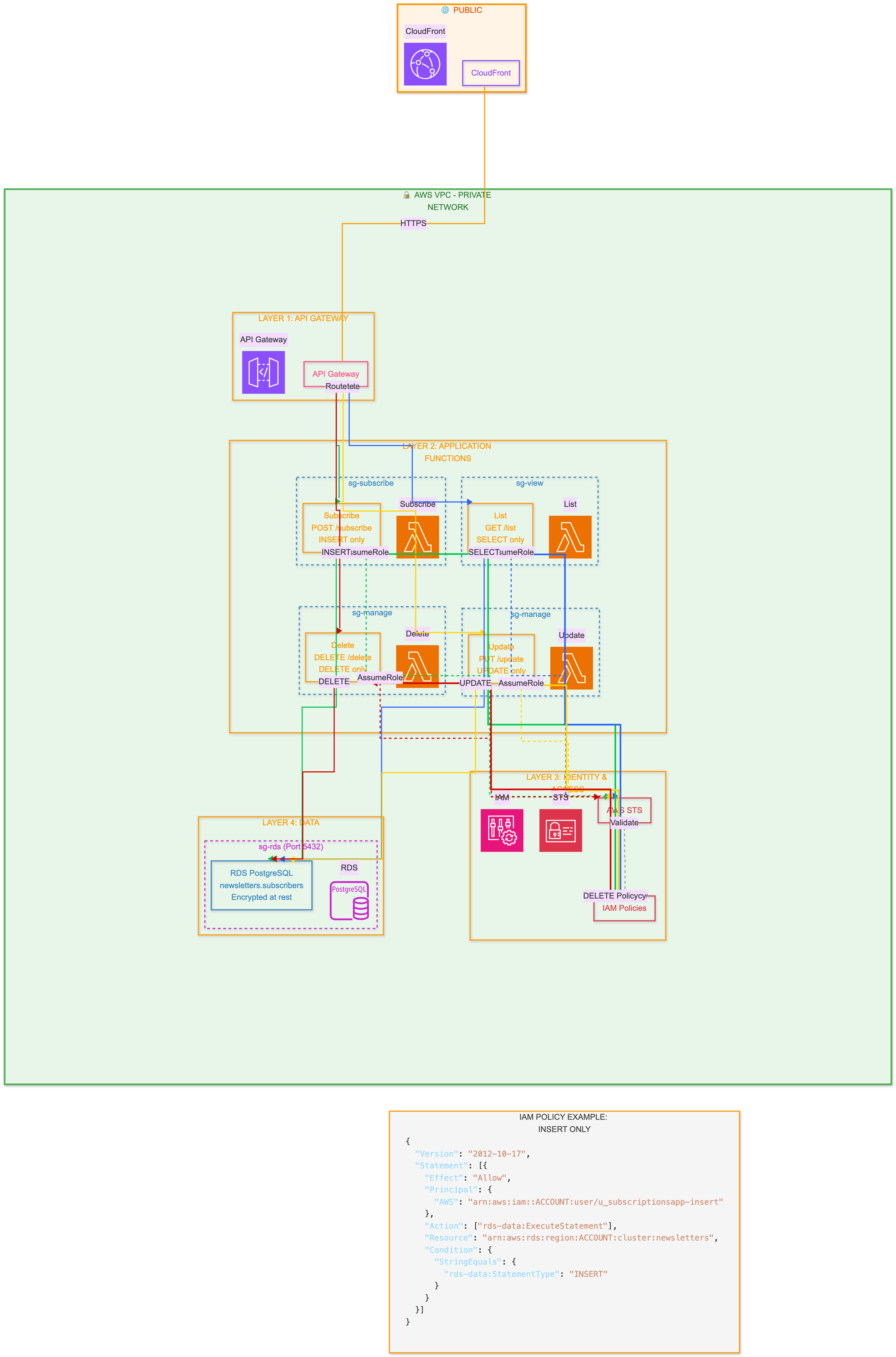
(I hope you appreciate this, the effort spent getting it the way I wanted was ridiculous! Also, for diagrams like this, Claude is your friend. Gemini will likely give you code that doesn’t work with libraries it suggests in python and node, and even on a fresh VM it doesn’t create the diagrams. You’ll run out of credits on ChatGPT rather quickly too)
In case you want to read the example IAM policy:
{
  “Version”: “2012-10-17”,
  “Statement”: [
    {
      “Effect”: “Allow”,
      “Principal”: {
        “AWS”: “arn:aws:iam::123456789012:user/u_subscriptionsapp-insert”
      },
      “Action”: [
        “rds-data:ExecuteStatement”
      ],
      “Resource”: “arn:aws:rds:eu-west-1:123456789012:cluster:newsletters”,
      “Condition”: {
        “StringEquals”: {
          “rds-data:StatementType”: “INSERT”
        }
      }
    }
  ]
}
— here we’re just granting the insert permission to the ingeniously named u_subscriptionsapp-insertz user, on the newsletters RDS database.
ZTNA
ZeroTrust Networking Access is another concept in the ZT family.
I think here, there are game-changers, especially compared to the problem they solve of “The VPN” granting access to anything (as is often the case, even if it’s not documented that way).
I’m a convert to TailScale as a ZTNA that works really nicely (although it really could do with a web interface to manage the rules for wider adoption). With tailscale, you have clear distinctions between:
- users
- groups
- machines / endpoints (there’s a client for AppleTV, amongst others)
- permissions
- TCP/UDP ports
- policy
e.g. you could grant all members of adatabase-adminteam only access todatabasetagged machines, and only on the database ports, from a managed device, during working hours, and after they’ve biometrically authenticated themselves (and can only be connected for 15 minutes (as an example)).
The connection is transparent to the user, and works by witchcraft and magic (aka: WireGuard).
It seems far more secure than connecting everything to the VPN (split tunnelling can be a right pain to get working), hoping people don’t misbehave, or use vulnerable devices because they’re scared of locking themselves out of the device if they do an update.
Wrap up
Hopefully you’ve now got a better understanding of my take on zerotrust; it’s one of those phrases that means a lot of different things, so I’d always seek clarification which part of zerotrust people are talking about if it’s not plainly obvious.
ZeroTrust, when working properly provides defence in depth — at each layer, the (ab)user is challenged, so access to one thing shouldn’t enable access to another — and that existing access should expire shortly any how.
Member discussion: